
WEBHOSTING BY DREHMOMENTE.DE
- What it's all about
- How to integrate your animations
- Contact us
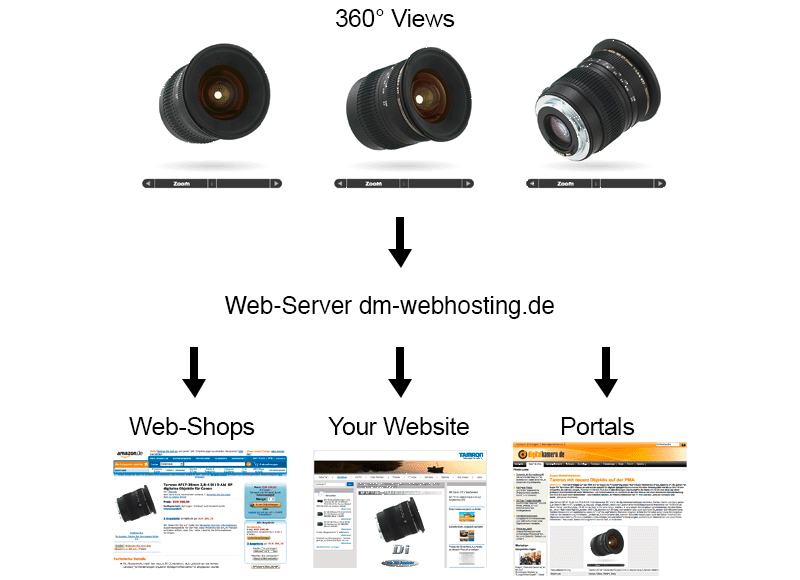
Once created, you may present your animations on any number of websites - made possible by drehmomente.de webhosting!
drehmomente.de hosts your animations and provides you with the respective links, which serve to seamlessly integrate your animations in your own website. In addition, you can make the links accessible to web shops, Internet portals and your distribution partners, who - without any extra efforts - may then also present your animations.
In a nutshell: webhosting by drehmomente.de makes integrating and forwarding your 360° images easier than ever!
YOUR BENEFITS AT A GLANCE
- You can use the animations promptly after they have been developed.
- Data handling becomes obsolete.
- Integration in your website does not require any extra efforts.
- Easy forwarding of your animations to web shops and Internet portals.
- Attractive conditions.
INTEGRATION MADE EASY
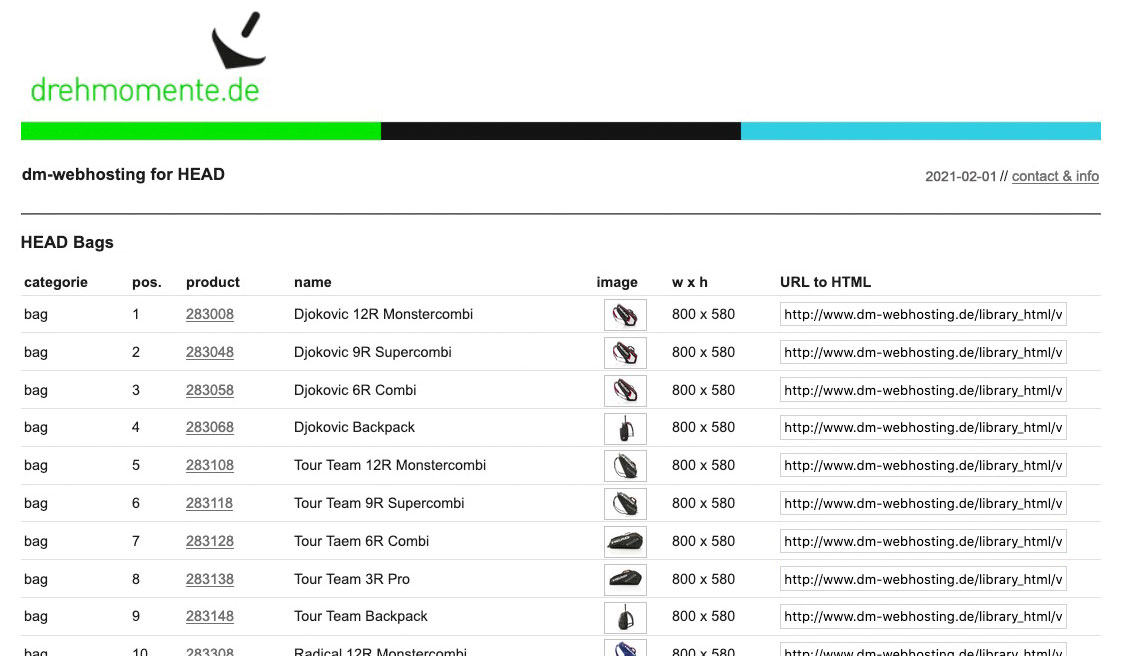 To integrate your animations in your website, you have to refer to them with the respective links. The overview page that we send you after the animations development contains the paths to the animations you need.
A number of ways exist to call up animations. We recommend that you use either of these methods:
IN A POP-UP
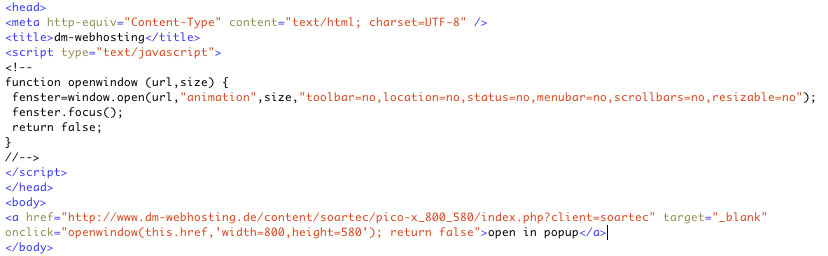 When you use a pop-up, your animations will open in a new window that you may define in more detail via a JavaScript. Integrate this short JavaScript in your website's <head>, and define the pop-up's features through parameters.
After this step, set a link to the respective animations in your website's <body>. This can be done with a text link or button. For the link, use the entire path to the "index.php" of the animation. In addition, define the pixel size for the pop-up that is contained in your link list on the overview page or in the folder name for the animation. At the end, the folder name contains first the width and then the height of your animation, separated by an underscore.
IN THE GREYBOX
 As opposed to a pop-up, no new window will open when you use the GreyBox to display your animations. Instead, the animation opens up on the current page while the background is darkened. This is an attractive display method that looks more elegant than a pop-up.
To use the Greybox, please download a small data package and save it on your web server. Then, link the Greybox scripts and style sheets in the <head>, now link the scripts and style sheets for the GreyBox. As with the pop-up solution, set a button link or text link to the respective animation and add rel="gb_page_center[width, height]" to the link. Replace the width and height in the square brackets with the respective pixel details contained in the overview page with your animations or in the folder name for the animation. At the end, the folder name contains first the width and then the height of your animation, separated by an underscore.
IN AN EXISTING WEBSITE
 To embed your animation directly into your website, you can selected from a number of solutions. From experience we recommend HTML5.
The exact selection of the HTML file will depend on the solution you use. Please remember to transfer the “client” variable along with the respective value (see the links on the page with the overview of your animations) to the HTML file. We will provide you with the suitable design for each of your distribution partners. These designs can then be retrieved via the “client” variable.
YOUR CONTACT FOR WEBHOSTING BY DREHMOMENTE.DE

Sebastian Kuhn
MD
Phone: ++49.911.3747769
E-Mail: s.kuhn@drehmomente.de
IMPRINT
Company Information:
drehmomente.de GmbH
Sebastian Kuhn
Hohenbuckstrasse 7
90425 Nuremberg
Germany
Phone: ++49 911 3747769
Fax: ++49 911 3747783
Internet: http://www.drehmomente.de
E-mail: box@drehmomente.de
Legal Notice:
Responsible for content pursuant to §10 (3) MDStV: Sebastian Kuhn
Authorized Managing Director: Sebastian Kuhn
box@drehmomente.de
Registration Office: Amtsgericht Fuerth
Registration Number: HRB 12326
VAT registration number pursuant to §27a of the Value Added Tax Law: DE 241/121/22474
drehmomente.de GmbH | Hohenbuckstrasse 7 | 90425 Nuremberg, Germany | http://www.drehmomente.de | Phone: ++49.911.37 477 6